


Smart Noter - AI Note Taker
4.5500.00 Reviews
App Specs
- Version
- 2.8.1
- Updated On
- License
- Free
- Downloads
- 5,000,000+
- Developer
- Deep Flow Apps
- Categories
- Productivity
- Platform
- Android, iOS
Screenshots
 Analysis by AppCompare
When I’m deciding whether a note-taking app is worth keeping, I look past the promise of tidy notebooks and ask a simpler question: does it turn information I would otherwise lose into something I can use later? Smart Noter is built around that problem. It is a productivity app from Deep Flow Apps that works with spoken notes, then helps turn them into text and more organized material. I find that focus useful, especially when writing everything down in the moment would interrupt the conversation or task I’m trying to follow.
What the free access and paid option mean
Smart Noter is free to download, so you can try its basic appeal without paying upfront. It also offers in-app purchases, with listed items ranging from $6.99 to $99.99 each. Those figures describe the available purchase range, not a promise that a particular feature or level of use costs a specific amount; I’d check the purchase screen in the app before deciding whether an upgrade makes sense for me.
That distinction matters because transcription and AI assistance sound valuable, but the right price depends on how often I would rely on them and what the paid options actually include. I wouldn’t pay simply because the app has AI in its name. I’d first test whether its audio-to-text workflow saves me time on the kinds of notes I regularly need, then compare the purchase being offered with my actual usage.
Where the time savings can be real
The strongest case for a tool like this is not that it can replace every notebook or writing app. It is that speaking a thought can be easier than stopping to type it. A student could capture a quick reminder after class, for example, then review the resulting text when there’s time to sort out what deserves a place in their study notes. A freelancer might record an idea between appointments rather than trust themselves to remember it later.
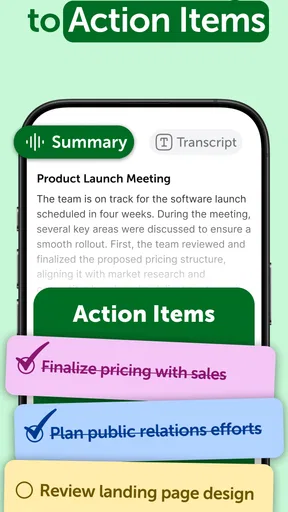
I’d treat an AI-generated summary or next-action suggestion as a first draft, not as an authority. For a planning conversation, the useful sequence is to capture the discussion, skim the transcription for names and decisions, and then check the suggested summary against what was actually agreed. That small review step is especially important if someone will act on the notes. Automated organization can reduce clerical work, but it does not remove the responsibility to correct misunderstandings.
How it fits beside familiar note-taking options
Compared with a plain notes app, Smart Noter’s appeal is the audio-first route: it aims to help turn spoken information into text and actionable notes instead of leaving me with only a blank page. A standard notes app can be the better pick when I want complete control over formatting, a straightforward typed list, or a familiar place for quick snippets. Smart Noter makes more sense when capturing speech is central to the task and I’m willing to review the result.
It also isn’t automatically a replacement for a dedicated recording workflow. If I need to preserve a conversation exactly as it sounded, I would keep the original audio where possible and not rely on a transcript as a substitute. Transcription can be convenient for finding the gist, but names, technical terms, overlapping speech, and background noise are all reasons to proofread before sharing or relying on it. For highly sensitive discussions, I’d first consider whether recording is appropriate at all.
Worth Reading Before You Choose

EA SPORTS FC Mobile 26 Is a Bigger Football Game, but It Takes Time

Flipboard Shows What News Apps Must Do Beyond the Feed

Switching to Android Auto Means Rethinking Your Driving Routine

Google Calendar Makes a Crowded Week Easier to Manage

Ludo King Makes the Most of the Minutes Between Plans

Baby Panda World Brings Quick Play to Modern Phones, but Its Game Library Feels Busy
A practical routine that keeps notes useful
One everyday use I can see is a commute home after a meeting or appointment. Rather than trying to type while walking, I could record a short recap once I’m somewhere safe: the main decision, one unresolved question, and the next thing I need to do. Later, I’d correct the text and turn the action into a reminder in whatever system I already use. Keeping each recording focused on one topic should also make it easier to find the right note later than making one long recording of the whole day.
For students, I’d use voice capture selectively rather than record every lecture and assume the app will produce perfect study material. A brief spoken recap after class can preserve what stood out and what still needs explaining, while the student’s own notes remain the source to check. For people who think aloud, short recordings can capture ideas before they disappear. For someone who prefers carefully formatted pages or works mostly with tables and structured documents, a conventional writing tool may be less friction.
There are a few practical questions worth answering before making it part of a routine. Can I use it on my phone? The minimum operating-system requirement is version 7.0, so I’d check that against my device before installing. Is it aimed at children? Its content rating is Everyone, though suitability still depends on how a family plans to use an audio recorder and what material is captured. Does it cost anything to start? It is free to download, while optional purchases are available. And should I trust a generated summary without checking it? No: I’d review any detail that could affect a decision, deadline, or another person.
Trying Smart Noter in everyday use
Have you ever found yourself drowning in a sea of notes, sticky pads, and random scribbles? I’ve been there too, and that’s why I was super curious to try out Smart Noter - AI Note Taker. This app promises to revolutionize the way we take notes by using AI to keep everything organized and accessible. Here’s my take on it after giving it a whirl on my phone.
First Impressions: A Sleek and Simple Design
Right off the bat, Smart Noter - AI Note Taker greets you with a minimalist interface. The design is clean and uncluttered, which I absolutely love. There’s nothing more frustrating than an app that’s supposed to simplify your life but ends up being a maze of features. Here, everything is where you’d expect it to be, making navigation a breeze.
Getting Started: Easy Setup
Setting up the app was a walk in the park. A quick download from the app store, and I was ready to go. I appreciate that it doesn’t ask for a ton of permissions or try to hook into every aspect of my phone. Just a straightforward setup, and I was jotting down my first note within minutes.
Features That Stand Out
What truly sets this app apart is its AI capabilities. The AI automatically categorizes your notes, which is a game-changer. Whether you’re jotting down meeting minutes, shopping lists, or random thoughts, the app intelligently sorts and stores them for easy retrieval. It’s like having a personal assistant who knows exactly where you put that crucial piece of information.
The search functionality is robust as well. You can search by keywords, and the results pop up almost instantly. This is especially handy if you’re like me and tend to forget where you filed that one important note.
Voice Notes and More
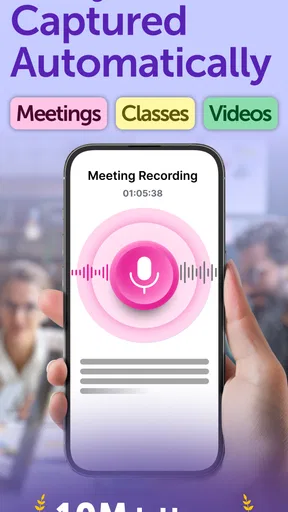
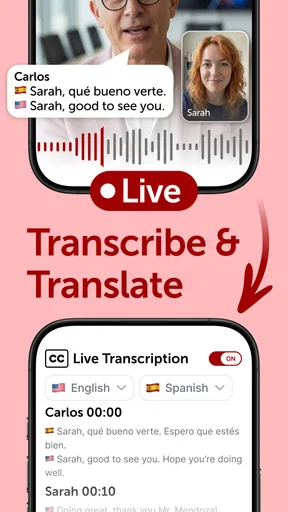
Another nifty feature is the ability to take voice notes. Sometimes, typing just doesn’t cut it, especially if you’re on the move. The app transcribes these voice memos into text, which is pretty accurate. I tested it in a variety of settings, and the transcription held up well, even in slightly noisy environments.
Sync Across Devices
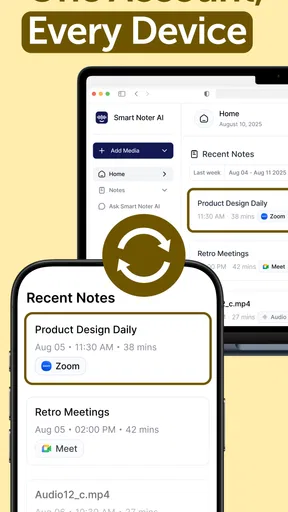
In today’s world, having your notes accessible on multiple devices is a must. Luckily, Smart Noter doesn't disappoint. My notes synced seamlessly between my phone and tablet. Whether I’m at my desk or out and about, everything I need is just a tap away.
Room for Improvement
No app is perfect, and Smart Noter is no exception. While the AI categorization is impressive, it’s not always spot-on. A few times, my notes ended up in unexpected categories. However, it’s easy enough to manually adjust them, and I’m optimistic that the AI will improve with time.
Another thing I’d love to see is more customization options for note-taking. Right now, the app sticks to a pretty basic format, and having a few more tools to personalize my notes would be fantastic.
Final Thoughts
Overall, Smart Noter - AI Note Taker is a solid choice for anyone looking to streamline their note-taking process. Its user-friendly interface, powerful AI features, and reliable cross-device syncing make it a standout option in a crowded market. While there’s room for enhancement, especially in customization, the app already offers a robust set of tools that can benefit students, professionals, and anyone in between.
If you’re tired of digging through piles of paper or endlessly scrolling through digital notes, give Smart Noter a try. It might just be the organizational tool you’ve been searching for.
Who is most likely to get value?
I’d consider it when my notes begin as speech: a quick idea, a meeting recap, or a thought I need to capture while my hands are busy. Its combination of transcription, summaries, and suggested next actions is most useful when I have enough material to benefit from a first pass of organization, but still plan to check the result myself. The app has an average rating of 4.4 from around 65,000 ratings, and more than 5 million installs, which suggests it has reached a broad audience; those numbers can help establish that it is widely used, but they don’t tell me whether it suits my particular workflow.
I’d be more cautious if I mainly need polished documents, detailed formatting, or dependable archiving of exact conversations. In those situations, a full-featured writing app or a dedicated recording method may be a better fit. Likewise, if I only make an occasional shopping list, the extra audio and AI steps may add little value over a basic notes tool. Smart Noter is best judged by whether it removes a recurring bottleneck, not by how many features sound impressive in isolation.
Small habits that improve the results
One useful habit is to say the context out loud at the beginning of a recording: what the note is about and why I’m saving it. That gives me a clearer starting point when I revisit the transcription and makes a short capture easier to distinguish from other notes. I’d also separate unrelated subjects instead of recording a stream of thoughts in one take. This is a simple way to reduce the chance that a summary blends separate decisions or that a useful detail gets buried.
For action-oriented notes, I’d speak in concrete terms: who needs to do what, and by when, if those details are known. Then I’d verify the transcription before treating a suggested next action as a real commitment. This is not a promise that the app will identify every task correctly; it is a workflow that makes errors easier to spot. If the note is important, I’d keep the corrected version in the place where I manage my tasks rather than assuming an audio note alone will remind me at the right time.
Choosing it with realistic expectations
Smart Noter is listed as free, with optional in-app purchases, and the current version is 2.3.1. It was released on December 26, 2024, and is developed by Deep Flow Apps. I would start with the free access, try a few recordings that resemble my real use, and only consider a purchase after checking what that specific option provides. The available purchase items range from $6.99 to $99.99; that broad span makes it especially important not to assume every user needs to pay or that one listed amount covers every feature.
The app’s main trade-off is the familiar one with AI-assisted notes: it can reduce the effort of capturing and sorting information, but I still have to spend attention checking what it heard and what it inferred. If I’m recording in a noisy place or using unfamiliar names, I’d review the transcript closely. If I need a verbatim record, I’d preserve the source recording rather than relying only on edited text. And for a private conversation, I’d think about consent and appropriateness before pressing record.
My buy-or-skip verdict is straightforward: I’d try it if audio is already a natural way for me to capture ideas and I want help turning those recordings into searchable, actionable notes. I’d skip it, or stick with a simpler alternative, if I rarely record myself, need extensive formatting, or expect AI to produce final, error-free minutes without review. Smart Noter is free to begin with, carries an Everyone content rating, and has a stated minimum operating-system requirement of 7.0. For me, its value depends less on the promise of automation than on whether it makes the notes I already need easier to keep and act on.
Pros
- AI-driven organization boosts productivity.
- Seamless syncing across all devices.
- User-friendly interface for quick navigation.
- Robust search functionality saves time.
- Supports multiple formats for diverse needs.
Cons
- Requires stable internet for optimal performance.
- Premium features locked behind a paywall.
- Occasional AI transcription errors.
- Limited customization for note layouts.
- Battery consumption can be high during use.
FAQs for Smart Noter - AI Note Taker
What features does Smart Noter - AI Note Taker offer?
Smart Noter - AI Note Taker provides a range of features designed to enhance productivity and organization. Key features include AI-powered transcription of voice notes, text recognition from images, customizable note templates, cloud synchronization for access across devices, and advanced search functionality to quickly find specific notes.
Is Smart Noter compatible with both Android and iOS devices?
Yes, Smart Noter - AI Note Taker is available for both Android and iOS platforms. It offers seamless user experience across different devices, allowing you to access and edit your notes whether you're on a smartphone or tablet, ensuring your information is always at your fingertips.
How does the AI transcription feature work in Smart Noter?
The AI transcription feature in Smart Noter uses advanced speech recognition technology to convert spoken words into text. This allows users to create notes on the go without typing. The AI learns and adapts to different accents and speech patterns for improved accuracy over time, making note-taking fast and easy.
Does Smart Noter require an internet connection to function?
Smart Noter does not require a constant internet connection for basic note-taking and editing. However, features like cloud synchronization and AI transcription may need an internet connection to function effectively. This allows users to back up their data and use the AI capabilities without interruption.
Is my data safe with Smart Noter - AI Note Taker?
Smart Noter prioritizes user data security by implementing encryption for all stored notes and information. The app uses secure cloud storage solutions to back up your data, ensuring that your notes are protected from unauthorized access. Regular updates and security patches further enhance data protection.


